Model Context Protocol: AI's USB-C Interface Explained
MCP is the open standard that lets AI systems seamlessly talk to any external tool or data source. Learn how it works, why Anthropic created it, and how to build servers for production use.

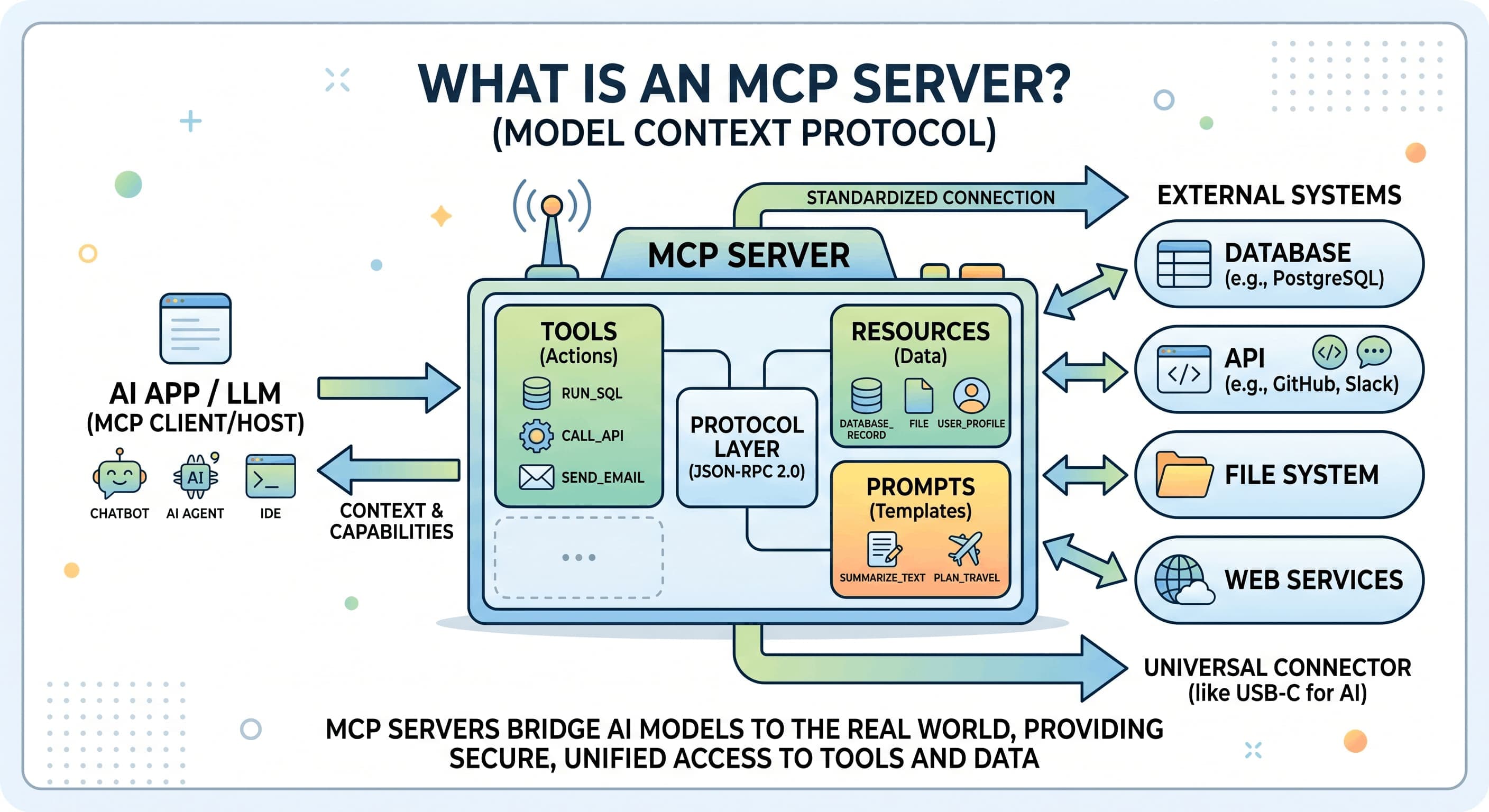
What is the Model Context Protocol (MCP)?
The Model Context Protocol is an open-source, open-standard protocol introduced by Anthropic in November 2024 to solve one of AI development's biggest headaches: the "N × M integration problem."
Imagine you're building an AI application that needs to talk to 10 different tools (Slack, GitHub, databases, APIs). Traditional approaches would require building 10 custom integrations per AI platform. With MCP, you build once, and any MCP-compatible client (Claude, ChatGPT, Cursor, VS Code Copilot) can instantly use your integration without rewriting anything.
Think of MCP as USB-C for AI — a single universal connector that lets any compliant host plug into any compliant server, immediately discovering and using its capabilities.
Technically, MCP is a JSON-RPC protocol that standardizes secure, bidirectional communication between AI applications and external tools, data sources, and services. Unlike traditional APIs designed for human-written, predictable workflows, MCP is built from the ground up for AI-first computing — where LLMs need dynamic resource discovery, rich context exchange, secure sandboxing, and the ability to ask questions.
The Problem It Solves: The N × M Integration Nightmare
Before MCP, integrating external tools with AI systems was a fragmented mess:
- Every AI platform (Claude, ChatGPT, Gemini, Cursor) had its own integration framework
- Every tool provider (GitHub, Slack, Notion, PostgreSQL) had to build custom connectors for each platform
- Maintenance burden exploded: a single tool × platform update meant rewriting code across multiple codebases
- Security was inconsistent: each integration implemented access control differently
- Context was limited: APIs were designed for simple request-response flows, not rich AI reasoning
The result? Thousands of isolated, duplicated, hard-to-maintain integrations.
MCP flips this: instead of N tools × M platforms = N×M integrations, you get N tools + M platforms = N+M integrations. Build an MCP server once for your tool; it works everywhere.
Who Built It: Anthropic's Vision for AI Infrastructure
Anthropic published the MCP specification on November 25, 2024, with reference SDKs in TypeScript and Python. Since then, the protocol has matured rapidly through three major spec releases:
- 2024-11-05: Initial specification release
- 2025-03-26: Enhanced security features
- 2025-06-18: Enterprise readiness improvements
- 2025-11-25: Latest production version
Beyond Anthropic, major AI providers have embraced MCP — OpenAI and Google DeepMind now support the protocol in their platforms. In December 2025, Anthropic made a historic move: they donated MCP to the Agentic AI Foundation (AAIF), a directed fund under the Linux Foundation co-founded by Anthropic, Block, and OpenAI.
This donation signals that MCP is no longer a single-company project — it's becoming infrastructure for the entire AI ecosystem.
How MCP Works: The Architecture
The "Mediated Access Pattern"
MCP implements a three-layer architecture:
┌─────────────────────────────────────────┐
│ AI System (LLM Client)                  │
│ (Claude, ChatGPT, Cursor, etc.)         │
└───────────────┬───────────────────────┘
                │ Requests context/tools
                │
┌───────────────▼───────────────────────┐
│ Host Application (Security Broker)     │
│ - Claude Desktop                       │
│ - IDE with Copilot                     │
│ - Web application                      │
│                                         │
│ ┌──────────┐ ┌──────────┐ ┌──────────┐│
│ │ Client A │ │ Client B │ │ Client C ││
│ │ (DB)     │ │ (Files)  │ │ (APIs)   ││
│ └────┬─────┘ └────┬─────┘ └────┬─────┘│
└─────┼────────────┼──────────────┼──────┘
      │            │              │
┌─────▼─┐    ┌─────▼─┐     ┌─────▼─┐
│Server A│    │Server B│    │Server C│
│(PG DB) │    │(FS)    │    │(APIs)  │
└────────┘    └────────┘    └────────┘
Key insight: The Host mediates ALL AI-to-resource interactions. This is crucial for security — AI never gets direct access to anything; the Host acts as a security broker deciding what's allowed.
The Three Primitives: Tools, Resources, and Prompts
MCP standardizes three types of capabilities an MCP server can expose:
1. Tools (Callable Actions) Tools are executable functions the AI can invoke. They're perfect for actions that change state — running queries, sending messages, creating records.
{
  "name": "run_sql_query",
  "description": "Execute a SQL query against the database",
  "inputSchema": {
    "type": "object",
    "properties": {
      "query": {"type": "string"},
      "timeout_ms": {"type": "number"}
    }
  }
}
2. Resources (Read-Only Data) Resources are read-only context — documents, files, database records, API responses. Think of them as knowledge the AI can reference but not modify directly.
{
  "uri": "file:///config/settings.json",
  "name": "Application Settings",
  "mimeType": "application/json",
  "description": "Current app configuration"
}
3. Prompts (Reusable Templates) Prompts are pre-engineered instruction templates the LLM can use as-is or customize. They encode best practices and domain-specific reasoning patterns.
{
  "name": "sql_optimization",
  "description": "Guide for optimizing slow SQL queries",
  "arguments": [
    {"name": "current_query", "description": "The slow query to optimize"}
  ]
}
Transport Layer: How They Communicate
MCP doesn't care how messages flow between client and server. Two transports are standard:
1. Stdio Transport Perfect for local processes on the same machine. The MCP server reads from stdin and writes to stdout — simple, efficient, zero network overhead.
Used by: Claude Desktop, local development tools
2. HTTP with Server-Sent Events (SSE) For remote servers. Client sends requests via HTTP POST; server sends responses and notifications via SSE.
Used by: Cloud-hosted servers, API-based integrations
Both transports use JSON-RPC 2.0 under the hood, so the protocol is identical — only the transport mechanism changes.
The Connection Lifecycle
Every MCP connection follows three phases:
1. Initialization
- Client sends
initializerequest with protocol version and capabilities - Server responds with its version and capabilities
- Client sends
initializednotification as handshake complete - Connection is now ready
2. Message Exchange
- Normal request-response patterns
- Either side can send requests or notifications
- Messages are validated and type-checked
3. Termination
- Clean shutdown via
close() - Or transport disconnection
- Resources are cleaned up
Building MCP Servers: Practical Implementation
SDK Support
Anthropic provides reference SDKs for the most common languages:
- TypeScript/JavaScript — Recommended for web-based servers; excellent tooling
- Python — Great for data science, ML, system automation
- Java — Enterprise support with full SDK features
- Go, Rust, Ruby, PHP, C#, Kotlin — Community implementations
You can build servers in any language, but the official SDKs make it significantly easier.
Example: A Simple File System Server (Python)
import asyncio
import mcp.types as types
from mcp.server import Server
from mcp.server.stdio import stdio_server
import os

app = Server("filesystem-server")

@app.list_resources()
async def list_resources() -> list[types.Resource]:
    """Expose files as resources"""
    resources = []
    for filename in os.listdir("/data"):
        resources.append(types.Resource(
            uri=f"file:///data/{filename}",
            name=filename,
            mimeType="text/plain"
        ))
    return resources

@app.read_resource()
async def read_resource(uri: types.AnyUrl) -> str:
    """Read a file's contents"""
    path = str(uri).replace("file://", "")
    with open(path, "r") as f:
        return f.read()

@app.call_tool()
async def call_tool(name: str, arguments: dict) -> list[types.TextContent]:
    """Execute tools"""
    if name == "search_files":
        pattern = arguments.get("pattern", "")
        results = [f for f in os.listdir("/data") if pattern in f]
        return [types.TextContent(
            type="text",
            text=f"Found files: {results}"
        )]
    return [types.TextContent(type="text", text="Unknown tool")]

async def main():
    async with stdio_server() as streams:
        await app.run(
            streams[0],
            streams[1],
            app.create_initialization_options()
        )

if __name__ == "__main__":
    asyncio.run(main())
This server:
- Exposes files in
/dataas Resources (read-only) - Implements a
search_filesTool (executable action) - Uses stdio transport for local communication
- Automatically handles initialization, type validation, error handling
Real-World Example: The ryans-mcp Blog Server
I built an MCP server that manages my Pixel Logic Team blog — it's a practical example of MCP in production:
Capabilities:
- Resources: Posts (drafts, published), writing guide, configuration
- Tools:
create_draft,publish_post,unpublish_post,get_post,list_posts - Prompts: Blog writing best practices, SEO checklists
Architecture:
- TypeScript/Node.js backend
- HTTP + SSE transport for remote access from Claude.ai
- Database stores posts, metadata, revision history
- Each tool validates input, handles errors, returns structured responses
Usage: I can ask Claude "create a blog post about MCP" and it:
- Calls
create_draftwith the full post content - Returns the post ID and URL
- Automatically saves as a draft (never auto-publishes)
- Returns a link for preview or editing
This would have taken weeks to build with traditional APIs. With MCP SDKs, it took a day.
Security: How MCP Keeps AI Sandboxed
One of MCP's biggest strengths is its security model. Unlike giving AI direct access to APIs, MCP enforces strict boundaries:
1. Capability Declaration Servers declare what they can do. The Host explicitly approves each capability.
{
  "capabilities": {
    "tools": {},
    "resources": {},
    "prompts": {}
  }
}
2. Scope Limiting Each client-server connection is isolated. The AI can only access resources explicitly served by that server.
3. Message Validation All messages are JSON-RPC validated. Invalid requests are rejected immediately.
4. Access Control Servers can implement:
- Authentication (who are you?)
- Authorization (what are you allowed to do?)
- Rate limiting (prevent abuse)
- Resource whitelisting (only expose safe things)
5. Error Isolation Errors in one server don't crash others. The Host isolates failures.
For example, in the blog server:
- Only
publish_postcan change state - It validates the post ID exists before publishing
- It returns structured errors instead of raw exceptions
- It logs all publishing events for audit trails
MCP vs. Alternatives: Why Use MCP?
vs. Function Calling (Claude API, OpenAI API)
Function calling is the model's native tool-calling mechanism. MCP is the integration layer above it.
- Function calling: "How does the model decide to call a tool?"
- MCP: "How do we securely connect the model to external systems?"
They work together. Most modern setups use both: function calling at the model level, MCP for infrastructure.
vs. Webhooks
Webhooks are one-way event notifications. MCP is bidirectional, standardized, type-safe, and doesn't require polling.
Webhooks: "Tell me when something happens" MCP: "Ask me about anything, any time, safely"
vs. REST APIs
REST APIs work fine for traditional integrations. MCP advantages:
- Zero setup per-integration: Just plug in an MCP server
- Rich context: Not just JSON blobs, but resources, tools, and prompts
- AI-native: Designed for dynamic LLM workflows, not human-written scripts
- Standardized security: Same auth model across all servers
Adoption: Who's Using MCP?
As of 2026, MCP support includes:
AI Platforms:
- Claude (Anthropic) — first-class support
- ChatGPT (OpenAI) — native support
- Google DeepMind — integrated
- Cursor (IDE) — built-in
- VS Code with Copilot — full support
Public Registry: The MCP Registry now lists 100+ community servers:
- Database servers (PostgreSQL, MongoDB, SQLite)
- File system servers (local, S3, GCS)
- API wrappers (Slack, GitHub, Linear, Notion)
- LLM-specific servers (embedding, prompt optimization)
- Custom domain servers (e-commerce, CRM, analytics)
Enterprise: Many companies use MCP internally for secure AI-augmented workflows, from financial analysis to code generation.
Getting Started: 5-Minute MCP Setup
1. Install Claude Desktop (If Using Locally)
# Download from https://claude.ai/download
# Install and launch
2. Configure Your First MCP Server
Edit ~/.claude/claude_desktop_config.json:
{
  "mcpServers": {
    "filesystem": {
      "command": "node",
      "args": ["/path/to/mcp-server.js"]
    }
  }
}
3. Restart Claude Desktop
The server is now available. Ask Claude: "What files are in my current directory?"
Claude will automatically:
- Discover the
filesystemserver - Call its
list_resourcesmethod - Parse the response
- Answer your question
4. Build Your Own Server
Use the TypeScript or Python quickstart:
TypeScript:
npm create mcp-server@latest my-server
cd my-server
npm run dev
Python:
pip install mcp
# Use the example server as a template
python -m mcp.server
Best Practices for Production MCP Servers
1. Input Validation Always validate user input before processing. Use type schemas.
2. Error Handling Return meaningful error messages without leaking sensitive data.
try:
    result = execute_query(sql)
except Exception as e:
    return error_response(
        code=-32603,
        message="Query execution failed",
        data={"hint": "Check query syntax"}  # Don't leak internals
    )
3. Logging & Monitoring Log all tool calls for debugging and audit trails. Monitor performance.
4. Rate Limiting If your server is public, limit requests to prevent abuse.
5. Documentation Write clear descriptions for all tools, resources, and prompts. The LLM reads these to decide how to use your server.
6. Versioning Use semantic versioning (1.0.0). Update the version when capabilities change.
The Future of MCP
As of mid-2026, MCP is rapidly evolving:
- MCP Bundle Format (.mcpb): Portable servers that bundle code, dependencies, and config into a single file
- Server Instructions: LLM-readable documentation so AI understands server capabilities
- Chrome DevTools MCP: Giving AI systems visibility into browser state
- Expanded transports: WebSocket, gRPC, and custom protocols beyond stdio/HTTP
The most significant shift: MCP is moving from a Claude feature to an industry standard. With Anthropic's donation to the Linux Foundation, expect:
- Vendor-neutral governance
- Formal standardization processes
- Enterprise security certifications
- Integration into enterprise AI platforms
Conclusion
The Model Context Protocol represents a fundamental shift in how AI systems integrate with external tools and data. Instead of building custom connectors for every combination of AI platform and external service, MCP provides a single, secure, standardized interface.
Whether you're:
- Building an AI application: Use MCP servers to safely extend your system's capabilities
- Running a tool/service: Create an MCP server to let any AI platform (Claude, ChatGPT, Cursor) integrate with you
- Building infrastructure: MCP is becoming the standard for AI integrations, like REST was for web APIs
The ecosystem is still young — the real value will come from the thousands of MCP servers built by the community. The foundation is solid, the adoption is accelerating, and the timing is perfect.
Start building. The AI future needs integration infrastructure, and MCP is it.
References:
- MCP Official Docs: https://modelcontextprotocol.info/docs/
- MCP Specification: https://modelcontextprotocol.info/specification/
- MCP Registry: https://modelcontextprotocol.info/tools/registry/
- SDKs: TypeScript, Python, Java (official); Go, Rust, etc. (community)
Server-side tracking insights, in your inbox
Case studies and engineering deep-dives — a few emails a year, no noise.
No spam. Unsubscribe any time with one reply.
Related posts
Why Our GTM MCP Server Logged Out Every 30 Minutes
A hosted MCP server dropped our session every 30 minutes. Running it ourselves fixed it - and revealed three Google OAuth traps nobody documents.
Claude Skills: Teach AI Your Team's Playbook
Pixel Logic TeamPrompts give you a clever generalist. Skills give Claude a specialist's playbook — your tools, your conventions, your footguns. Here's how they work.